


An assistant that answers your customers within seconds, in the messaging app they already use, without building an app.
A WhatsApp chatbot with n8n and Claude takes three building blocks: Meta's WhatsApp Business API to receive and send messages, n8n to orchestrate the workflow, and Claude (Anthropic) to understand each request and write the reply. If your Meta and Anthropic accounts already exist, a first working bot takes about 30 minutes.
This guide follows the order of a real build. You'll set up the webhook, extract the message from Meta's payload, connect Claude with a solid system prompt, add memory, hand conversations over to a human, and stay within WhatsApp's anti-ban rules. We finish with the mistakes that most often break a first WhatsApp chatbot, and a simple way to decide whether to build it yourself or hand it off.
One thing before you start: a bot that sends marketing messages needs the recipients' consent. The consent workflow is covered in our guide to CNIL-compliant WhatsApp opt-in with n8n.
Can you connect Claude to WhatsApp?
Yes. For a business number, the reliable route uses two official APIs:
- Meta's WhatsApp Business Platform (Cloud API): it forwards every inbound message to a URL you choose (the webhook) and accepts replies through the Graph API.
- The Anthropic API: it takes the customer's text and returns Claude's reply.
Between the two, you need a conductor that receives the webhook, keeps the conversation history and decides when a human should take over. That is n8n's job.
You'll also come across tools that drive WhatsApp Web or the consumer app. These are not official Meta APIs. They put your number at risk of being blocked and are not suitable for customer-facing use. This tutorial sticks to the official APIs.
Why use n8n and Claude for a WhatsApp chatbot?
The pairing solves a very concrete problem: absorbing repetitive questions without tying up a person for every message. The most common uses:
- Tier-1 support: opening hours, order tracking, FAQs, around the clock.
- Lead qualification: the bot asks the right questions (need, timeline, budget) and creates the record in your CRM.
- Appointment booking: slot checks, confirmation and reminders.
- Delivery updates: contextual answers based on an order number.
A concrete example: we delivered a 24/7 WhatsApp assistant for a client. It qualifies incoming requests, answers FAQs and books appointments outside business hours. That is exactly the pattern in this tutorial, in its production form.
Why n8n rather than code written from scratch? n8n already ships the connectors (WhatsApp, HTTP, databases), a native AI Agent node and a visual canvas your whole team can read.
Why Claude? Anthropic's models follow long instructions well (tone, limits, escalation procedure) and handle several languages natively. The range runs from fast and cheap (Haiku) to most capable (Opus), so you can match cost to need.
What architecture does a WhatsApp chatbot with n8n and Claude need?
Keep it simple. WhatsApp pushes the message to n8n. n8n hands the reasoning to Claude, with memory and tools. The reply goes back to WhatsApp, or the conversation is passed to your team.
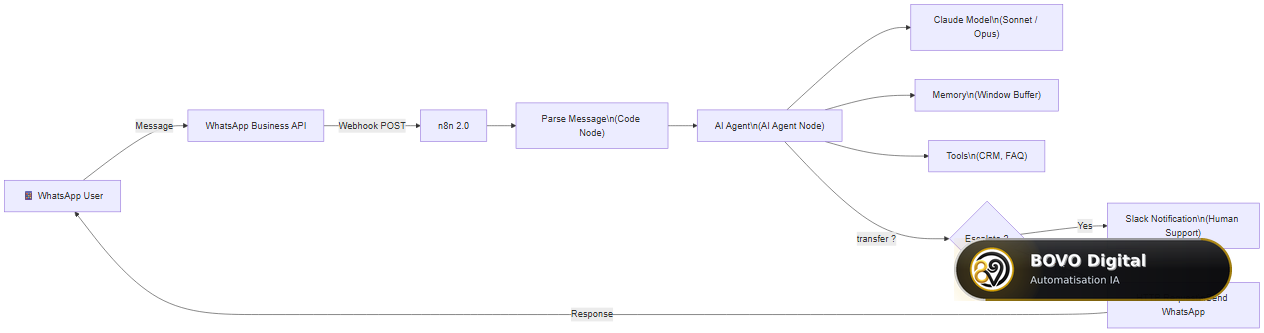 WhatsApp chatbot architecture: from webhook reception to response delivery or escalation to human support
Each block maps to an n8n node. You can later add a knowledge base (RAG) or a ticket-creation node without rebuilding anything.
What do you need before you start?
n8n: cloud or self-hosted?
- n8n Cloud: instant start and a ready-made HTTPS webhook URL. Ideal to validate the idea.
- Self-hosted n8n (Docker): full control and your data stays with you. Locally, expose the instance through an HTTPS tunnel, because Meta requires a public HTTPS URL.
For a first test, cloud is faster. For production with customer data, self-hosting is often the better choice.
A WhatsApp Business API account (Meta)
This is the most administrative step. You need a Meta Business portfolio, an app in Meta for Developers with the WhatsApp product enabled, a dedicated number (not in use on the regular WhatsApp app) and an access token. Meta provides a free test number so you can build before switching to a verified number.
An Anthropic API key
Create an account in the Anthropic console and generate an API key. Billing is per token. Store the key in n8n credentials, never in plain text inside a node.
Persistent memory (for production)
Plan for Redis or Postgres/Supabase as soon as the bot leaves the prototype stage. n8n has memory nodes for both.
How does a message travel, end to end?
Before configuring each node, picture the full journey of one message.
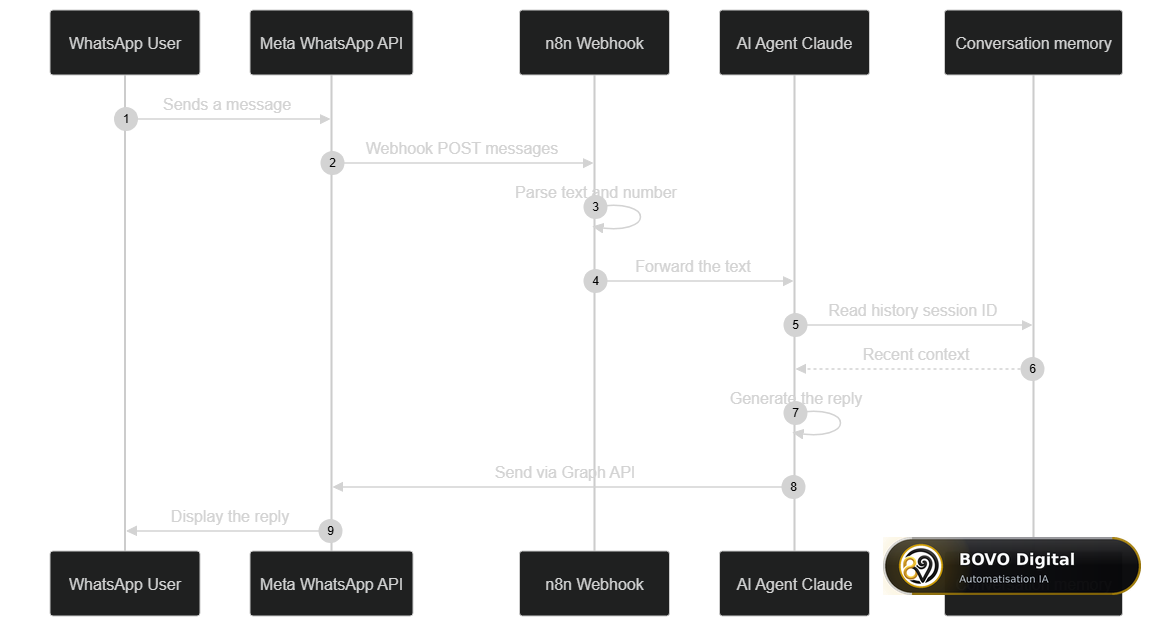 Detailed sequence: webhook reception, parsing, conversation-memory read, Claude generation, and reply delivery via the Graph API
This view is mostly a debugging tool. If nothing reaches the customer, check the last link (the Graph API send). If Claude replies out of context, check memory and the Session ID.
Step 1: how do you set up the WhatsApp webhook in n8n?
The webhook is the front door: Meta calls it for every inbound message.
- Create a new n8n workflow.
- Add a Webhook node using POST and copy its production URL.
- In Meta for Developers, open WhatsApp > Configuration, paste the URL and choose a verify token (a secret string).
- Subscribe the webhook to the
messagesfield. It carries both inbound messages and delivery statuses.
Common pitfall: before activating the webhook, Meta sends a GET verification request with a hub.challenge parameter. Your endpoint must return that challenge unchanged, with a 200 status. In n8n, add a second Webhook node on GET followed by a Respond to Webhook node. Until this handshake succeeds, no message arrives.
Alternative: n8n also offers a WhatsApp Trigger node. It uses Meta OAuth credentials and manages the subscription for you, so it's quicker to wire up. The manual webhook is still useful to see exactly what comes in and to verify request signatures yourself.
Step 2: how do you extract the incoming message?
Meta's payload is deeply nested. A Code node pulls out the useful fields (simplified example; adapt it for non-text messages):
// The raw body sent by Meta arrives in $input
const body = $input.first().json.body;

// The useful message is nested: entry > changes > value > messages
const message = body.entry?.[0]?.changes?.[0]?.value?.messages?.[0];

// Return a flat object, easier to use in downstream nodes
return [{
  json: {
    from: message?.from,            // sender number (used as Session ID)
    text: message?.text?.body,      // text content of the message
    type: message?.type,            // 'text', 'image', 'audio', etc.
    messageId: message?.id          // unique id, used to drop duplicates
  }
}];
Good habit: not every webhook carries a message. Statuses (sent, delivered, read) come through the same channel. Add an If or Switch node that only lets through requests containing a text message. Otherwise Claude gets called, and billed, for nothing.
Step 3: how do you connect Claude in n8n?
This is the chatbot's brain.
- Add an AI Agent node.
- Attach an Anthropic Chat Model sub-node and pick the model: Haiku for simple support, Sonnet or Opus for harder reasoning.
- Add your Anthropic key in n8n credentials.
- Feed the extracted text (
{{ $json.text }}) into the agent.
What does a good system prompt for a WhatsApp chatbot look like?
The system prompt turns a generic model into your brand's assistant. It sets the role, tone, limits and escalation procedure. An example to adapt:
You are the virtual assistant of [COMPANY_NAME], reachable on WhatsApp.

ROLE
- Answer customer questions about our products, opening hours and orders.
- Be warm, clear and concise (2 to 4 sentences maximum per message).

LIMITS
- Never promise a discount, refund or deadline you cannot be sure to keep.
- If you don't have the information, say so honestly and offer escalation.
- Never invent a product reference, a price or a policy.

ESCALATION
- If the customer asks for a human, is unhappy, or the request is out of
  scope, end your reply with the marker [HUMAN_ESCALATION].

STYLE
- Always reply in the language the customer writes in.
- No excessive emojis, no technical jargon.
The [HUMAN_ESCALATION] marker is deliberate: a downstream node can detect it easily and trigger the handoff.
Step 4: which conversation memory should you choose?
Without memory, the bot forgets everything between messages. Attach memory as a sub-node of the AI Agent, using the WhatsApp number ({{ $json.from }}) as the Session ID, so each customer has their own thread.
| Criterion | Simple Memory | Redis | Postgres / Supabase |
|---|---|---|---|
| Persistence | No (in-process) | Yes | Yes |
| Setup | Instant | Simple | Moderate |
| Best for | Prototype | Fast sessions with expiry | Durable, queryable history |
| Survives a restart | No | Yes | Yes |
Rule of thumb: start with Simple Memory (formerly Window Buffer Memory) and a window of about 10 messages. Move to Redis once real traffic arrives, or to Postgres/Supabase if you also want to analyse the history. Window size drives cost directly: everything you keep is sent back to Claude with each new message.
Step 5: how do you send the reply back on WhatsApp?
An HTTP Request node posts Claude's reply through Meta's Graph API (simplified example):
{
  "method": "POST",
  "url": "https://graph.facebook.com/v23.0/PHONE_NUMBER_ID/messages",
  "headers": {
    "Authorization": "Bearer {{ credentials }}",
    "Content-Type": "application/json"
  },
  "body": {
    "messaging_product": "whatsapp",
    "to": "{{ $json.from }}",
    "type": "text",
    "text": { "body": "{{ $json.output }}" }
  }
}
Replace PHONE_NUMBER_ID with your number's ID from Meta for Developers. The token goes through n8n credentials, never hard-coded. The Graph API version changes regularly: check the current one in Meta's documentation before going live.
Step 6: how do you hand the conversation to a human?
A good chatbot knows its limits. A clean handoff prevents frustration and protects your brand.
- Marker detection: if the reply contains
[HUMAN_ESCALATION], the workflow routes to your team. - Keyword detection: "speak to someone", "complaint", "refund" trigger the handoff.
- Team notification: a Slack (or email) node sends the number, the last message and a summary of the conversation.
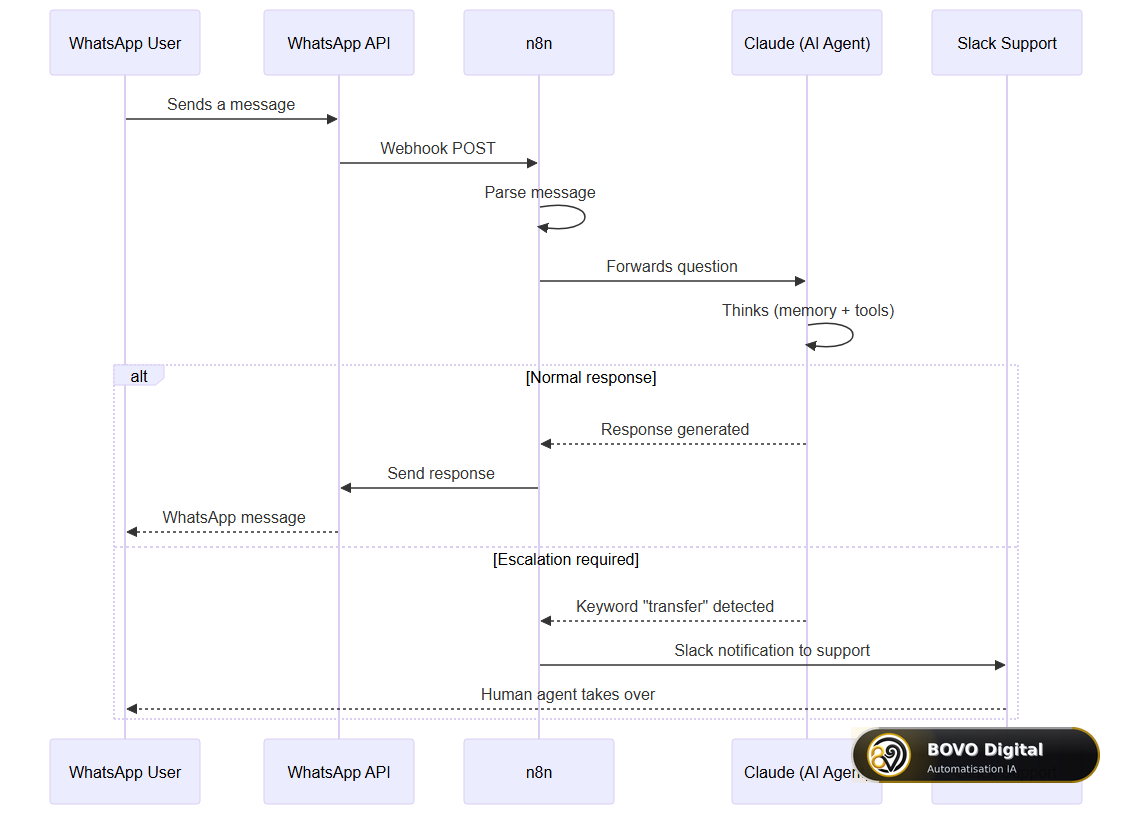 Sequence diagram: how the chatbot detects a transfer request and notifies the support team via Slack
Always tell the customer ("I'm passing your request to a colleague"). Then flag the conversation as "human-handled", for example in Redis, so the bot doesn't talk over your agent.
How do you keep WhatsApp from blocking your number?
Meta protects its users from spam. Careless sending can lower your number's quality rating, cut your messaging limits or get the number suspended. Three rules, set out in Meta's WhatsApp Business policy, should shape the workflow:
- The 24-hour window: a free-form message (so, a Claude reply) is only allowed within 24 hours of the customer's last message. After that, only a Meta-approved template can be sent.
- Opt-in: only message people who agreed to hear from you. The n8n setup (double opt-in, STOP keyword, proof of consent) is in our WhatsApp opt-in guide.
- Quality: Meta tracks blocks and reports. Keep an eye on the quality rating in WhatsApp Manager.
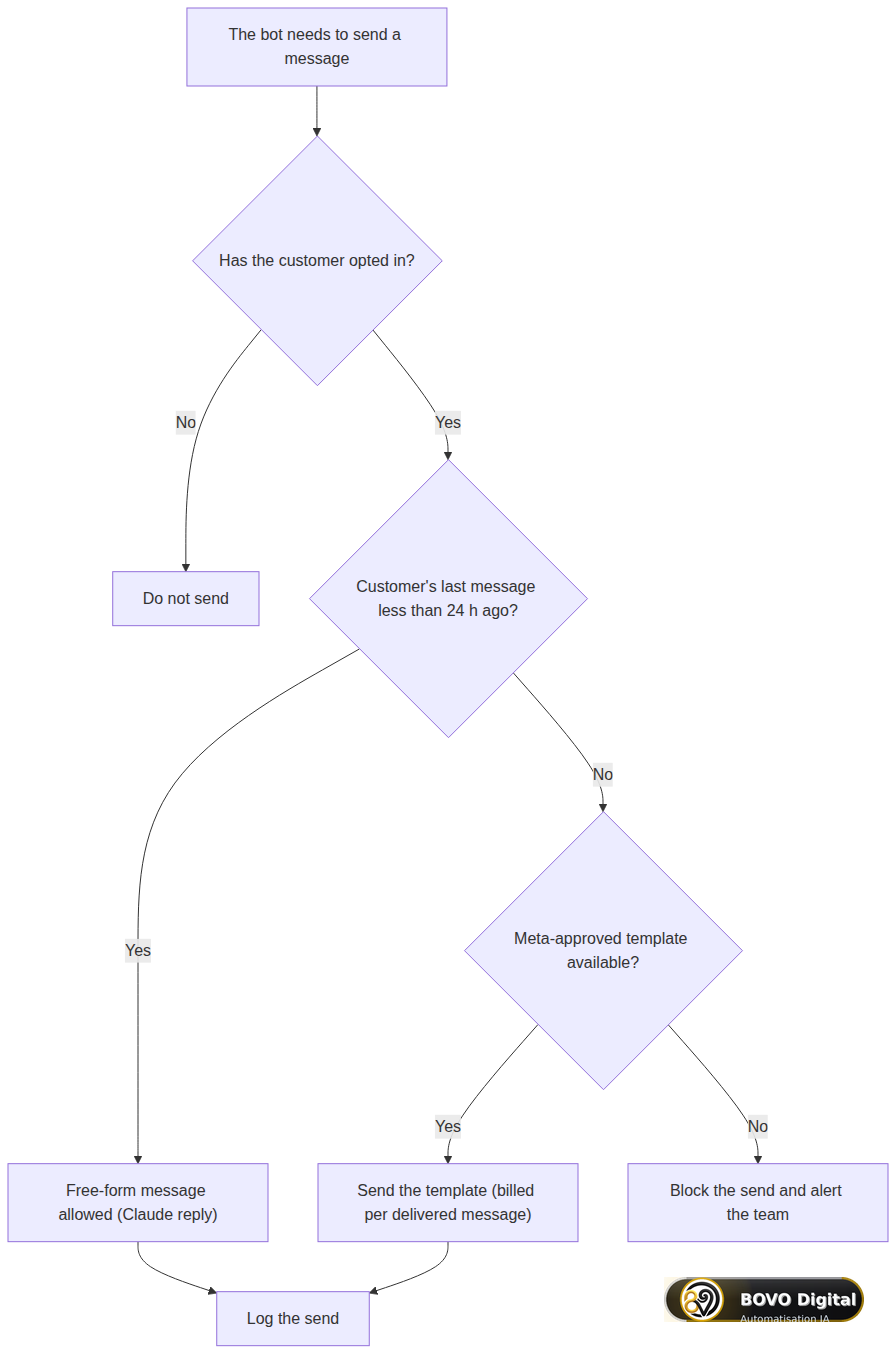 Before every send: check opt-in, then the 24-hour window, then whether an approved template is available
Turn this tree into If nodes in n8n: store the time of each customer's last inbound message and block any free-form send after 24 hours. It's one of the simplest and most useful safeguards you can add.
How much does a WhatsApp chatbot with n8n and Claude cost?
If you build it yourself, three items add up. Prices change often, so always check the official rate cards.
- n8n: free when self-hosted (server aside), monthly subscription in the cloud based on executions.
- Claude: billed per token, input and output. Haiku costs far less than Opus, with Sonnet in between (see Anthropic's pricing page). For short messages, the cost per conversation stays low, provided you cap the memory window.
- WhatsApp (Meta): since 1 July 2025, Meta bills each delivered template message rather than each 24-hour conversation. The rate depends on the country and the category (marketing, utility, authentication). Free-form replies inside the 24-hour window follow separate rules. The detailed figures are in our article on WhatsApp Business API pricing in 2026.
To estimate the human workload that remains, think in terms of split: how many conversations the bot resolves alone, and how many it hands over. The chart below is a fictional example to illustrate that reasoning, not a measurement.
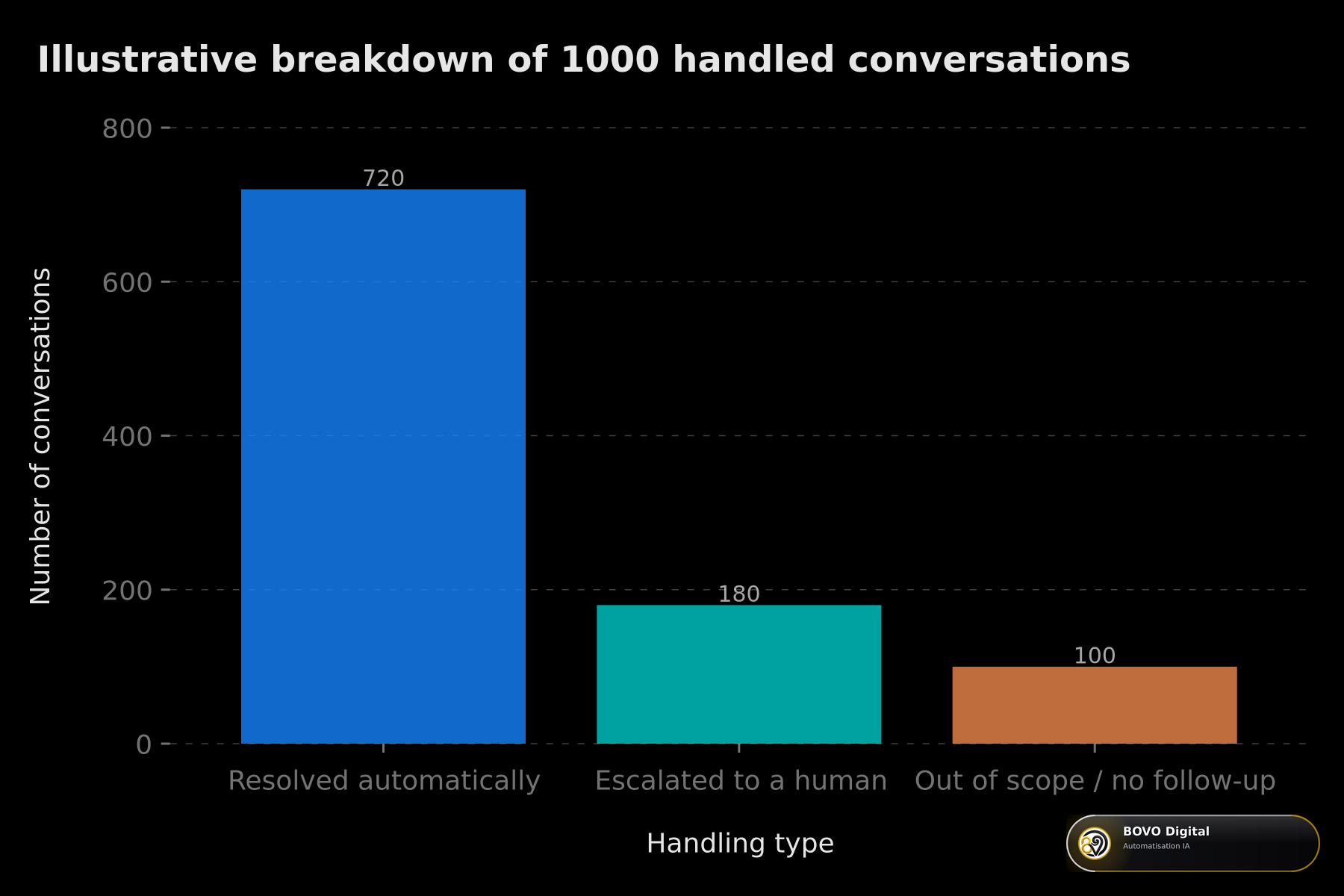 Fictional example of how 1,000 conversations split: handled by the bot, handed to a human, and out of scope
If you have it built, the main cost becomes the project itself. Our packages are listed below, and the pricing method is explained in custom AI chatbot pricing in 2026.
How do you test the chatbot before going live?
Never deploy straight onto your customers' number.
- Meta's test number: it sends and receives real messages to an allow-list of numbers.
- Step-by-step execution in n8n: inspect each node's output and see exactly what Claude receives.
- Pinned data: pin a fake inbound webhook to replay the workflow without calling Meta each time.
- A set of ten typical messages: simple question, off-topic request, unhappy customer, voice note, request for a human. Check every reaction, handoff included.
Log every exchange from day one of testing: inbound message, Claude's reply, handoff decision. That's how you catch weak answers before a real customer sees them.
How do you secure the chatbot in production?
A WhatsApp chatbot handles personal data: phone numbers and conversation content.
- Verify webhook signatures: Meta signs every request with the
X-Hub-Signature-256header. Reject any request whose signature doesn't match your App Secret. - Keep secrets in n8n credentials: WhatsApp token, Anthropic key, database access.
- Limit retention: keep history only as long as you need it, in line with GDPR.
- Add a kill switch: one variable that turns the bot off during an incident, instead of letting hundreds of wrong replies go out.
Be wary of workflows you download without reading them: we explain why in how a free template can cost €24,700.
What mistakes should you avoid with a WhatsApp chatbot?
Here are the seven most common failures in a first build, from the network layer up to the bot's logic.
1. The webhook won't activate. Your endpoint isn't returning hub.challenge with a 200 status. Check that the URL is public HTTPS, that the verify token is identical on both sides (it's case-sensitive) and that the GET branch actually responds. n8n's execution logs show the request received and the response sent.
2. No reply reaches the customer. Three suspects: the Meta test token expired (it lasts 24 hours), the Phone Number ID is wrong, or the message went out after the 24-hour window without a template. In that last case Meta returns error 131047. Read the response body in the HTTP Request node to tell them apart.
3. Claude mixes up conversations. The Session ID is almost always to blame. A fixed value makes every customer share the same history. Use the sender's number, and check that memory is attached to the AI Agent.
4. The customer gets the same reply twice. Meta resends a webhook when your endpoint answers too slowly. Return 200 straight away and process afterwards. Store each handled messageId and skip any you've already seen.
5. The Claude bill keeps climbing. The agent is being called on delivery statuses, or on images and voice notes with no text. The filter from Step 2 fixes it.
6. 401 or 403 errors from Anthropic. The key is missing or revoked, or the credit balance is empty. Check the Anthropic console and set budget alerts.
7. The bot replies in the wrong language. Without an instruction, Claude may follow the system prompt's language. The rule "Always reply in the customer's language" is enough.
Beyond the technical side, two design mistakes come up again and again: trying to automate everything on day one, and not deciding who answers once the bot hands over. A bot that promises a callback nobody makes does more harm than having no bot at all.
Should you build it yourself or have it built?
This tutorial is enough for a first FAQ bot. The question changes once the chatbot touches revenue: lead qualification, booking, CRM sync, several channels, sensitive data.
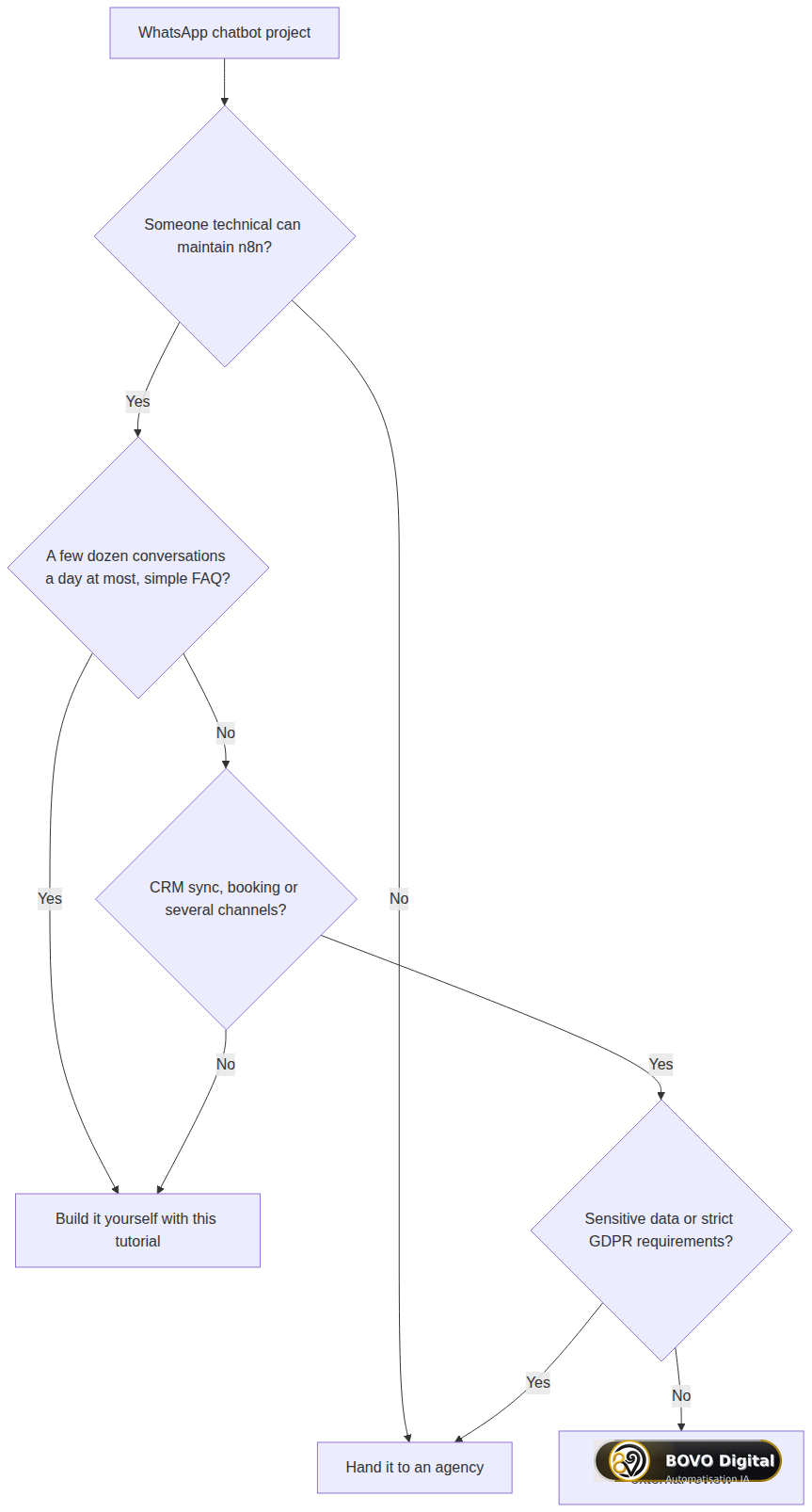 Build or delegate: in-house n8n skills, volume, business integrations and data sensitivity
If you have it built, here are our public chatbot packages:
| Package | Price | Scope | Timeline |
|---|---|---|---|
| Chatbot Essentiel | €2,000 | 1 channel (website or WhatsApp), knowledge base up to 50 answers | 2–3 weeks |
| Conversationnel Pro | €3,500 | Website + WhatsApp + Messenger, memory, booking, CRM, human handoff | 3–5 weeks |
| Vocal + Chatbot Enterprise | €5,000 | Omnichannel + voice agent (Twilio, ElevenLabs) | 6–8 weeks |
An agent wired into an ERP or complex business rules falls outside these packages and gets its own quote.
Would you rather we build it for you? Our team designs WhatsApp assistants that qualify your leads, book appointments and hand over to your team at the right moment. See our WhatsApp Business automation offer, or our AI chatbot agency page for a multi-channel project. 118 projects delivered, 82 five-star reviews on ComeUp. Tell us about your project.
Conclusion: start small, then harden
You now have a complete WhatsApp chatbot with n8n: webhook, message extraction, a Claude agent driven by a clear system prompt, memory, human handoff and anti-ban safeguards.
Start on Meta's test number, with Simple Memory and a light model. Validate twenty or so conversations. Then move to persistent memory, approved templates and cost monitoring. Treat the system prompt and handoff rules as living assets: review the conversations that went wrong every week and adjust.
Method: how we built this guide
The steps follow the official documentation from Meta (WhatsApp Cloud API), n8n and Anthropic, checked in October 2026, together with our own chatbot project work. Limits: n8n node names, the Graph API version and prices all change, so check them before going live. The code samples are simplified. The conversation-split chart is fictional: we do not publish an average resolution rate.


