


On June 9, 2026, roughly 70 Microsoft/Azure GitHub repos linked to AI tooling were compromised. If you combine n8n, GitHub Actions, and coding agents, this tutorial is your hardening checklist — not tomorrow, today.
The June 9, 2026 supply chain attack does not target n8n directly. It targets developer workstations cloning "official" repos, installing npm packages, and running post-install scripts with local credentials — Azure tokens, GitHub PATs, OpenAI keys, .env variables.
That is exactly the profile of teams automating with n8n: they connect GitHub, cloud APIs, and CI/CD webhooks. A compromised GitHub PAT with workflow scope can modify your pipelines. An exfiltrated cloud token can trigger malicious n8n workflows or read encrypted credentials if the encryption key is also on the machine.
This tutorial answers step by step: 7 stages, copy-ready code examples, n8n + GitHub Actions architecture, and developer sandbox rules. It starts with the urgent post-incident actions, then covers the other weak points of an automated deployment.
Step 0: understand your exposure surface
Before code, map who is exposed in your organization:
| Profile | Post-incident risk | Immediate action |
|---|---|---|
| Dev using Cursor / Claude Code | High | PAT rotation + cloned repo audit |
| n8n ops with GitHub access | High | Revoke unused OAuth apps |
| External freelancer | Very high | Dedicated PATs per project, minimal scopes |
| SMB without dedicated ops | Medium | Apply secure-release workflow below |
 Day 0: secret rotation — Week 1: Actions hardening — Week 2: n8n alerts — Month 1: supply chain review
Time bombs in automated deployments — mutable tags, hardcoded secrets, unscanned Docker images — become critical in this context. The Microsoft incident reminds us supply chain attacks target trust habits, not only zero-days.
Step 1: immediate secret rotation (Day 0)
Goal: invalidate any credential potentially exfiltrated between May and June 2026.
Rotation checklist
- GitHub PAT — Settings → Developer settings → Personal access tokens → revoke all tokens created before June 9, 2026.
- GitHub Actions secrets — Settings → Secrets and variables → Actions → regenerate
N8N_WEBHOOK_URL, API keys, deploy tokens. - n8n credentials — Credentials → filter GitHub, HTTP Header Auth, OAuth → reconnect with new tokens.
- Cloud — Azure, OpenAI, AWS: rotate via console + 30-day audit logs.
- npm tokens — npmjs.com → Access Tokens → revoke and recreate if publish enabled.
# Simplified example — list GitHub PATs via CLI (visible scopes)
gh auth status
gh api user/tokens --jq '.[] | {note: .note, scopes: .scopes, created: .created_at}'
Document each rotation in a ticket (Notion, Linear) with date and owner — useful proof for client audits.
Step 2: harden GitHub Actions with SHA pinning
Tags like v4 or main are mutable. After maintainer account compromise, a tag can point to malicious code.
Before (risky)
- uses: actions/checkout@v4
- uses: trufflesecurity/trufflehog@main
After (SHA pinning)
# Simplified example — .github/workflows/secure-release.yml
name: Secure Release

on:
  push:
    branches: [main]
  pull_request:
    branches: [main]

permissions:
  contents: read
  security-events: write

jobs:
  security-gate:
    runs-on: ubuntu-latest
    steps:
      - name: Checkout
        uses: actions/checkout@11bd71901bbe5b1630ea94775b8de457384c928a # v4.2.2

      - name: Secret scan
        uses: trufflesecurity/trufflehog@26bfa61a2277e4d6b71d2289b744c1a4a8c0a3f1
        with:
          path: ./
          base: ${{ github.event.repository.default_branch }}
          head: HEAD
          extra_args: --only-verified

      - name: Dependency audit
        run: npm audit --audit-level=high

      - name: Notify n8n on failure
        if: failure()
        run: |
          curl -X POST "${{ secrets.N8N_SECURITY_WEBHOOK }}" \
            -H "Content-Type: application/json" \
            -d '{
              "repo": "${{ github.repository }}",
              "branch": "${{ github.ref_name }}",
              "actor": "${{ github.actor }}",
              "run_url": "${{ github.server_url }}/${{ github.repository }}/actions/runs/${{ github.run_id }}",
              "severity": "high"
            }'
Minimal permissions: the permissions block limits GITHUB_TOKEN rights — key principle after the Microsoft incident where over-privileged workflows amplified impact.
To get an Action SHA: repo commits tab → copy full hash. Update quarterly, not every push.
Step 3: integrate TruffleHog and Semgrep as CI gates
Secret scanning is direct defense against exfiltration observed in attack #73. The Claude Code npm leak (March 2026) shows a complementary vector: .map files and secrets in published bundles.
# Simplified example — Semgrep SAST step
- name: SAST with Semgrep
  uses: returntocorp/semgrep-action@6f838de956a4348a44a2e001259faaf2a2b4a0a8
  with:
    config: >-
      p/security-audit
      p/owasp-top-ten
      p/javascript
Combine SAST (dangerous code patterns) and secret scan (hardcoded credentials). Both are complementary: Semgrep does not replace TruffleHog.
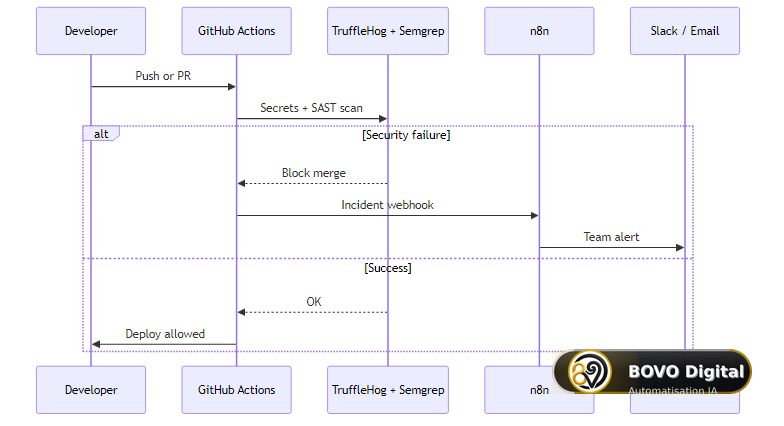 From developer push to TruffleHog/Semgrep scan: merge blocked and n8n webhook to Slack on failure
Step 4: secure your n8n instance
Critical environment variables (self-hosted)
# Simplified example — n8n production .env
N8N_ENCRYPTION_KEY=<32+ random chars — NEVER commit>
N8N_BASIC_AUTH_ACTIVE=true
N8N_BASIC_AUTH_USER=admin
N8N_BASIC_AUTH_PASSWORD=<strong password>
WEBHOOK_URL=https://n8n.yourdomain.com/
N8N_BLOCK_ENV_ACCESS_IN_NODE=true
N8N_GIT_NODE_DISABLE_BARE_REPOS=true
N8N_BLOCK_ENV_ACCESS_IN_NODE=true prevents malicious workflows from accessing server environment variables via expressions — recommended hardening since n8n 1.x.
Access rules
- 2FA mandatory for all n8n Cloud users or self-hosted admins.
- RBAC: read-only accounts for business users, edit reserved for ops.
- Backup: JSON workflow export + encrypted DB backup off n8n server.
- Network: IP allowlist or VPN if self-hosted; no public n8n without authentication.
Workflows we deploy for clients — see five n8n workflows 2026 — always include logging nodes without secrets and per-environment credentials (staging / prod).
Step 5: n8n security alert workflow
Target architecture:
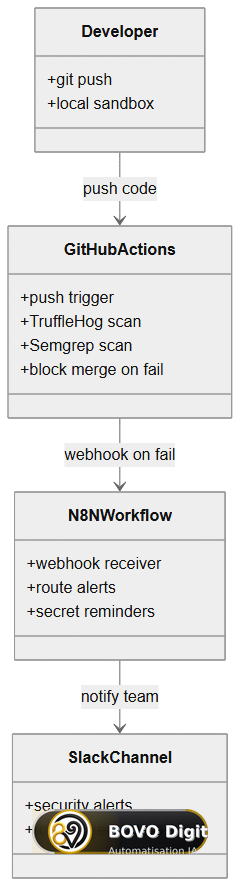 GitHub Actions triggers n8n webhook on scan failure; n8n routes to Slack and secret rotation reminders
n8n webhook configuration (simplified structure)
Workflow structure:
- Webhook (POST) — path
/security-alert - Set — normalize payload (repo, severity, run_url)
- IF —
severity === 'critical' - Slack —
#alerts-securitywith@hereif critical - Email — tech lead if high
- Notion / Linear — auto-create ticket
Example n8n Code node to enrich alert:
// Simplified example — n8n Code node
const payload = $input.first().json;
const severity = payload.severity || 'medium';
const emoji = severity === 'critical' ? '🚨' : severity === 'high' ? '⚠️' : 'ℹ️';

return [{
  json: {
    ...payload,
    message: `${emoji} CI security failure — ${payload.repo} (${payload.branch})`,
    slack_blocks: [
      {
        type: 'section',
        text: {
          type: 'mrkdwn',
          text: `*${emoji} Pipeline blocked*\nRepo: \`${payload.repo}\`\nAuthor: ${payload.actor}\n<${payload.run_url}|View run>`
        }
      }
    ]
  }
}];
Test with curl before connecting GitHub Actions — a silent webhook is worse than no alert.
Test curl payload
curl -X POST "https://n8n.yourdomain.com/webhook/security-alert" \
  -H "Content-Type: application/json" \
  -d '{
    "repo": "org/test-repo",
    "branch": "main",
    "actor": "dev-test",
    "run_url": "https://github.com/org/test-repo/actions/runs/1",
    "severity": "high"
  }'
Verify Slack receipt, ticket creation, and no secrets in n8n logs (Settings → Log level → avoid debug in prod).
Step 6: developer sandbox — stop blind trust execution
The Microsoft attack exploits trust in "official" open source repos. Team rule:
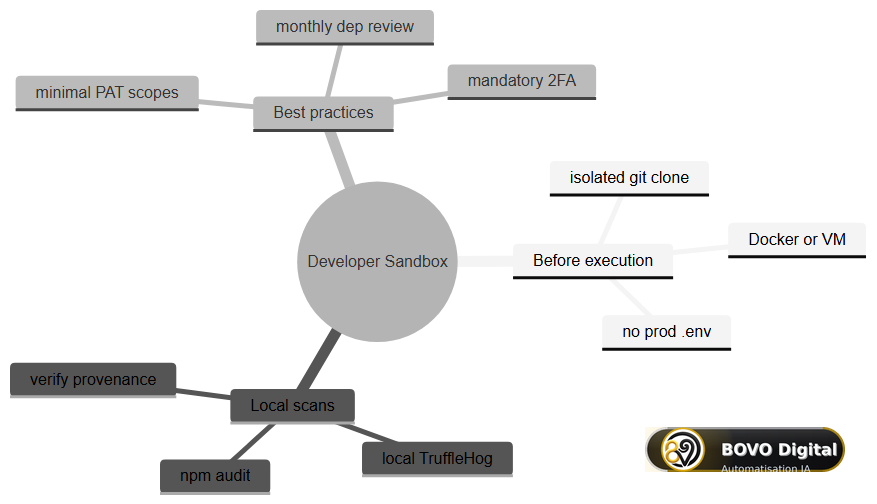 git clone → Docker/VM sandbox → npm audit + local TruffleHog → execution; without sandbox, .env exfiltration risk
# Simplified example — clone and audit in isolated container
docker run --rm -v "$(pwd):/work" -w /work node:20-alpine sh -c "
  git clone --depth 1 https://github.com/example/repo.git app &&
  cd app &&
  npm audit --audit-level=high &&
  npm ci &&
  node suspicious-script.js
"
Never clone an Azure/Microsoft SDK repo on the host machine with .env containing prod tokens. Use disposable credentials for exploration.
Recommended team policy (post-incident #73)
- Microsoft/Azure repos cloned only in VM or container without network access to prod credentials.
- Ban exporting
GITHUB_TOKENor PAT to un audited local scripts. - Mandatory review of npm
postinstallscripts beforenpm cion client projects. - Freelancers: PAT per project, revoked at end of engagement — no shared personal PAT.
These rules reduce exposure even if you did not directly clone a compromised repo.
Beyond secrets: six more points to lock down
The previous steps handle the emergency: secrets, pinned Actions, scans, alerts. An automated deployment pipeline has other, less visible weak points worth closing before the next incident.
Unverified Docker images
Your container's base image (node:20, python:3.12…) was built by someone else and can ship vulnerable packages. Scan every image before deployment with Trivy, block the deployment on critical or high vulnerabilities, and reference official images by digest rather than by tag.
# Simplified example — Trivy scan in the pipeline
- name: Scan the Docker image
  uses: aquasecurity/trivy-action@0.28.0
  with:
    image-ref: myapp:${{ github.sha }}
    exit-code: '1'
    severity: CRITICAL,HIGH
Permissions that are too broad
Each job should hold only the rights it needs. Remove everything at workflow level (permissions: {}), then grant the bare minimum job by job: a build job has no business writing releases, a staging deployment has no business touching production. If a job is compromised through a dependency, its rights limit the damage.
Secrets leaking into logs
GitHub Actions masks ${{ secrets.* }} values, but not a value built from a secret, such as a full connection string. Mask it explicitly, and remove echo steps that print environment variables.
# Simplified example — mask a value built from a secret
- name: Build and mask the connection string
  run: |
    DB_URL="postgresql://user:${{ secrets.DB_PASS }}@${{ secrets.DB_HOST }}/prod"
    echo "::add-mask::$DB_URL"
    echo "DB_URL=$DB_URL" >> $GITHUB_ENV
No automatic rollback
A green pipeline does not guarantee a working application. Define how to return to the previous version before the first deployment: kubectl rollout undo on Kubernetes, or keeping the artifacts of the latest versions with a rollback script triggered by health checks on a classic server.
Static cloud keys and access without MFA
Require two-factor authentication on every account that touches production: GitHub organization, cloud consoles, secrets manager, Docker registry. For deployments, prefer OIDC: the workflow gets temporary credentials from the cloud provider, with no permanent key stored in GitHub Secrets (the job then needs the id-token: write permission).
# Simplified example — AWS authentication via OIDC, no static key
- name: AWS authentication via OIDC
  uses: aws-actions/configure-aws-credentials@v4
  with:
    role-to-assume: arn:aws:iam::123456789012:role/github-actions-deploy
    aws-region: eu-west-3
Human approval before production
GitHub Environments let you require approval from one or more designated reviewers before any production deployment. Add a light dynamic test on staging: a few targeted requests that check security headers, authentication and that no sensitive endpoint is exposed. For npm packages, add an .npmignore that excludes **/*.map, .env*, keys and tests, and a prepublishOnly script that reruns the build and your checks before every npm publish, even from a developer's machine.
Step 7: continuous checklist — 7 monthly points
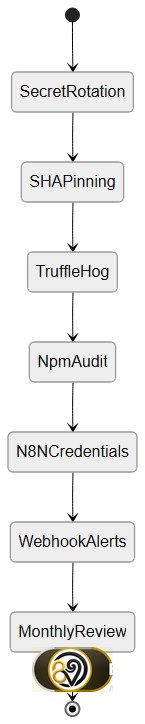 Sequential states: secret rotation → SHA pinning → TruffleHog → npm audit → n8n credentials → alert webhooks → monthly review
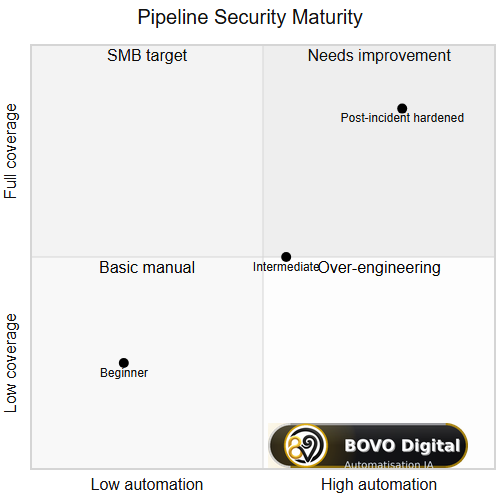 From manual beginner to post-incident hardened pipeline: SMB target = high automation and full coverage
| # | Control | Frequency | Tool |
|---|---|---|---|
| 1 | Critical secret rotation | 90 days | GitHub, cloud console |
| 2 | Verify Actions SHA pinning | Quarterly | Dependabot, manual review |
| 3 | TruffleHog on git history | Every PR | GitHub Actions |
| 4 | npm audit / Snyk | Every PR | CI |
| 5 | n8n credentials audit | Monthly | Export + scope review |
| 6 | Test alert webhooks | Monthly | curl + Slack verify |
| 7 | Team cloned repos review | Monthly | Questionnaire + logs |
For production Next.js projects, cross-check with our Next.js 16 production checklist for SMBs — security headers, environment variables, and deployment without Vercel lock-in.
Complete workflow: assembled secure-release.yml
Single file combining steps 2-3 — simplified example to adapt:
name: Secure Release Pipeline

on:
  pull_request:
    branches: [main]
  push:
    branches: [main]

permissions:
  contents: read

jobs:
  security:
    runs-on: ubuntu-latest
    steps:
      - uses: actions/checkout@11bd71901bbe5b1630ea94775b8de457384c928a

      - name: TruffleHog secrets scan
        uses: trufflesecurity/trufflehog@26bfa61a2277e4d6b71d2289b744c1a4a8c0a3f1
        with:
          extra_args: --only-verified

      - name: npm audit
        run: npm audit --audit-level=high

      - name: Block sensitive files in dist
        run: |
          npm run build
          if find dist -name "*.map" 2>/dev/null | grep -q .; then
            echo "Source maps in dist — blocked"
            exit 1
          fi

      - name: Alert n8n
        if: failure()
        env:
          WEBHOOK: ${{ secrets.N8N_SECURITY_WEBHOOK }}
        run: |
          curl -sf -X POST "$WEBHOOK" \
            -H "Content-Type: application/json" \
            -d "{\"repo\":\"${{ github.repository }}\",\"severity\":\"high\",\"run_url\":\"${{ github.server_url }}/${{ github.repository }}/actions/runs/${{ github.run_id }}\"}"
This pipeline would have blocked accidental source map publication like in the Claude Code npm incident.
Troubleshooting: common issues after hardening
TruffleHog blocks CI on revoked secret. Use --only-verified. If blocking persists, run trufflehog git file://. --only-verified locally to find source commit, then git filter-repo or rotation + .gitignore depending on severity.
n8n webhook receives nothing. Check: production URL (not test), workflow active, n8n firewall allows GitHub IPs, N8N_SECURITY_WEBHOOK secret in GitHub Actions. Test curl manually from self-hosted runner if network restricted.
npm audit blocks on transitive vulnerability without fix. Document exception in audit-ci.json or .nsprc with linked JIRA ticket and review date. Never disable audit globally — open door post supply chain incident.
n8n GitHub OAuth credentials invalid after rotation. Reconnect via Credentials → GitHub → OAuth2 or Personal Access Token per your setup. Update all workflows referencing old credential ID.
SHA pinning breaks CI after Action update. Create quarterly reminder (n8n workflow or Dependabot) to verify SHAs of critical Actions. Obsolete SHA misses security patches — balance immutability and maintenance.
Conclusion — key takeaways
The June 9, 2026 Microsoft supply chain incident does not require abandoning n8n or GitHub Actions. It requires treating pipelines as production assets: secret rotation, SHA pinning, automated scans, n8n alerts, developer sandbox.
Top priority today: revoke PATs and cloud tokens created before June 9, deploy TruffleHog on every PR, connect an n8n webhook so CI failures are never silent.
This week: implement secure-release.yml, test a fake alert, document the procedure for freelancers and external agencies. Supply chain security is a continuous process — not a single ticket.
DevSecOps with n8n: Why a Reverse Proxy Isn't Enough
Many articles on n8n security stop at telling you to configure an Nginx reverse proxy with TLS. That's necessary, but it's the equivalent of locking your door while leaving the keys in the lock. In a DevSecOps environment, the real vulnerability lies in the CI/CD pipeline (GitHub Actions) that deploys your workflows. A hardcoded API key in a GitHub repo can compromise your entire infrastructure, even behind the best proxy in the world. This is where secrets management and SHA pinning come in.
Integration with your existing n8n workflows
If you already have business workflows in production — CRM sync, follow-ups, reporting — security hardening must not break them. Recommended procedure:
- Duplicate n8n environment (staging) before any credential rotation.
- Test each workflow with new GitHub/API tokens.
- Deploy
secure-release.ymlon asecurity/hardeningbranch first. - Merge to
mainonce webhook curl is validated.
The five n8n workflows deployed for clients follow this pattern: CI/CD security layer on top, unchanged business logic below. Separation avoids mixing DevSecOps alerts and revenue automations.
For Next.js stacks coupled to n8n (API route webhooks), apply in parallel the Next.js 16 production checklist: per-environment variables, no secrets in repo, security headers on exposed webhook routes.
Why this matters beyond Microsoft: supply chain trend 2026
The June 2026 Microsoft incident is not isolated. It follows the Claude Code npm source map leak, XZ Utils (2024), and recurring npm package compromises. Attackers target developer trust because it scales: one poisoned repo reaches thousands of machines.
Teams combining n8n + GitHub + AI agents are high-value targets: they hold cloud tokens, CI/CD write access, and often client data in the same .env. Hardening is not paranoia — it is the cost of doing business with open source and automation in 2026.
Schedule a 30-minute security review this week with every person who has cloned a Microsoft/Azure repo since May 2026. Log results. Repeat monthly until supply chain tooling (Dependabot, TruffleHog, SHA pinning) runs on every repository without exception.
Get Your n8n Workflows Audited by BOVO Digital
If you have doubts about the security of your pipelines or handle sensitive data through n8n, our team of DevSecOps experts can perform a comprehensive audit of your architecture. We will identify vulnerabilities in your CI/CD chain and implement industry best practices to protect you against supply chain attacks. Contact us for a DevSecOps audit.
June 2026 series — read by category
| Category | Related article |
|---|---|
| Web development | Next.js 16 production checklist |
| Automation | 5 n8n workflows for clients |
| Entrepreneurship | Outsource or hire ops |


